
目录项目开发流程说明项目需求说明项目的界面项目代码实现实现基本功能(先使用面向过程,后面改成面向对象)功能1:先完成可以显示主菜单,并且可以退出功能2:完成可以显示明细和登记收入的功能功能3:完成...
目录
项目开发流程说明项目需求说明
项目的界面
项目代码实现
实现基本功能(先使用面向过程,后面改成面向对象)
功能 1:先完成可以显示主菜单,并且可以退出
功能 2:完成可以显示明细和登记收入的功能
功能 3:完成了登记支出的功能
项目代码实现改进
对项目的扩展功能的练习
项目开发流程说明

项目需求说明
模拟实现基于文本界面的《家庭记账软件》该软件能够记录家庭的收入、支出,并能够打印收支明细表
项目的界面


项目代码实现
实现基本功能(先使用面向过程,后面改成面向对象)
功能 1:先完成可以显示主菜单,并且可以退出
思路分析:
根据给出的界面完成,主菜单的显示, 当用户输入 4时,就退出该程序
走代码:
package main

import "fmt"

func main(){
 key := ""
 loop := true

 for{
 fmt.Println("-------------------家庭收支记账软件-------------------")
 fmt.Println("                     1 收支明细")
 fmt.Println("                     2 登记收入")
 fmt.Println("                     3 登记支出")
 fmt.Println("                     4 退出软件")
 fmt.Print("请选择(1-4):")
 fmt.Scanln(&key)

 switch key {
 case "1":
 fmt.Println("-------------------当前收支明细-------------------")
 case "2":
 fmt.Println("                     登记收入")
 case "3":
 fmt.Println("                     登记支出")
 case "4":
 loop = false
 default:
 fmt.Println("请输入正确的选项!")
 }
 if !loop{
 break
 }
 }
 fmt.Println("退出该软件!")
}
功能 2:完成可以显示明细和登记收入的功能
思路分析:
因为需要显示明细,我们定义一个变量 details string 来记录还需要定义变量来记录余额(balance)、每次收支的金额(money), 每次收支的说明(note)
package main
import "fmt"
func main() {
key := ""
loop := true
balance := 10000.0
money := 0.0
note := ""
details := "收支\t账户金额\t收支金额\t说 明"
for {
fmt.Println("-------------------家庭收支记账软件-------------------")
fmt.Println(" 1 收支明细")
fmt.Println(" 2 登记收入")
fmt.Println(" 3 登记支出")
fmt.Println(" 4 退出软件")
fmt.Print("请选择(1-4):")
fmt.Scanln(&key)
switch key {
case "1":
fmt.Println("-------------------当前收支明细-------------------")
fmt.Println(details)
case "2":
fmt.Println("本次收入金额:")
fmt.Scanln(&money)
balance += money
fmt.Println("本次收入说明")
fmt.Scanln(¬e)
details += fmt.Sprintf("\n收入\t %v \t %v \t \t %v", balance, money, note)
fmt.Println(" 登记收入")
case "3":
fmt.Println(" 登记支出")
case "4":
loop = false
default:
fmt.Println("请输入正确的选项!")
}
if !loop {
break
}
}
fmt.Println("退出该软件!")
}
功能 3:完成了登记支出的功能
思路分析:
登记支出的功能和登录收入的功能类似,做些修改即可
走代码:
package main
import "fmt"
loop:=true
balance := 10000.0
money := 0.0
note := ""
details := "收支\t账户金额\t收支金额\t说 明"
for {
fmt.Println("-------------------家庭收支记账软件-------------------")
fmt.Println(" 1 收支明细")
fmt.Println(" 2 登记收入")
fmt.Println(" 3 登记支出")
fmt.Println(" 4 退出软件")
fmt.Print("请选择(1-4):")
fmt.Scanln(&key)
switch key {
case "1":
fmt.Println("-------------------当前收支明细-------------------")
fmt.Println(details)
case "2":
fmt.Println("本次收入金额:")
fmt.Scanln(&money)
balance += money
fmt.Println("本次收入说明")
fmt.Scanln(¬e)
details += fmt.Sprintf("\n收入\t %v \t %v \t \t %v", balance, money, note)
fmt.Println(" 登记收入")
case "3":
fmt.Println("本次支出金额:")
fmt.Scanln(&money)
balance -= money
fmt.Println("本次支出说明")
fmt.Scanln(¬e)
details += fmt.Sprintf("\n支出\t %v \t %v \t \t %v", balance, money, note)
fmt.Println(" 登记支出")
case "4":
loop = false
default:
fmt.Println("请输入正确的选项!")
}
if !loop {
break
}
}
fmt.Println("退出该软件!")
项目代码实现改进
#### 12.4.2 项目代码实现改进
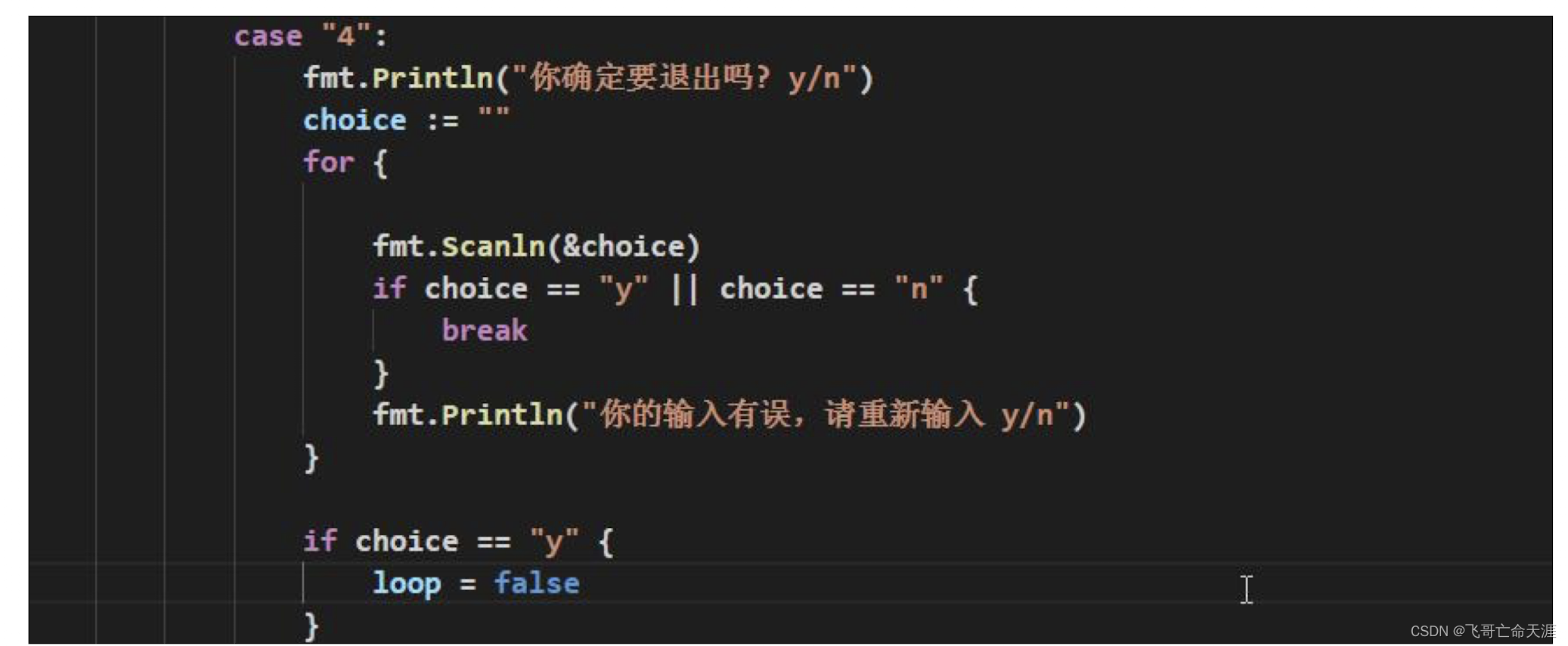
1) 用户输入 4 退出时,给出提示"你确定要退出吗? y/n",必须输入正确的 y/n ,否则循环输入指
令,直到输入 y 或者 n
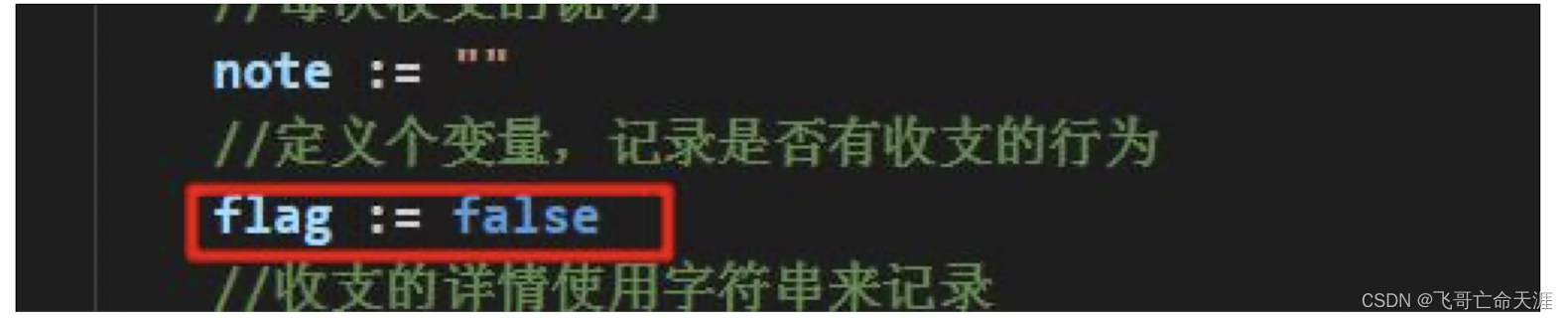
2) 当没有任何收支明细时,提示 "当前没有收支明细... 来一笔吧!"
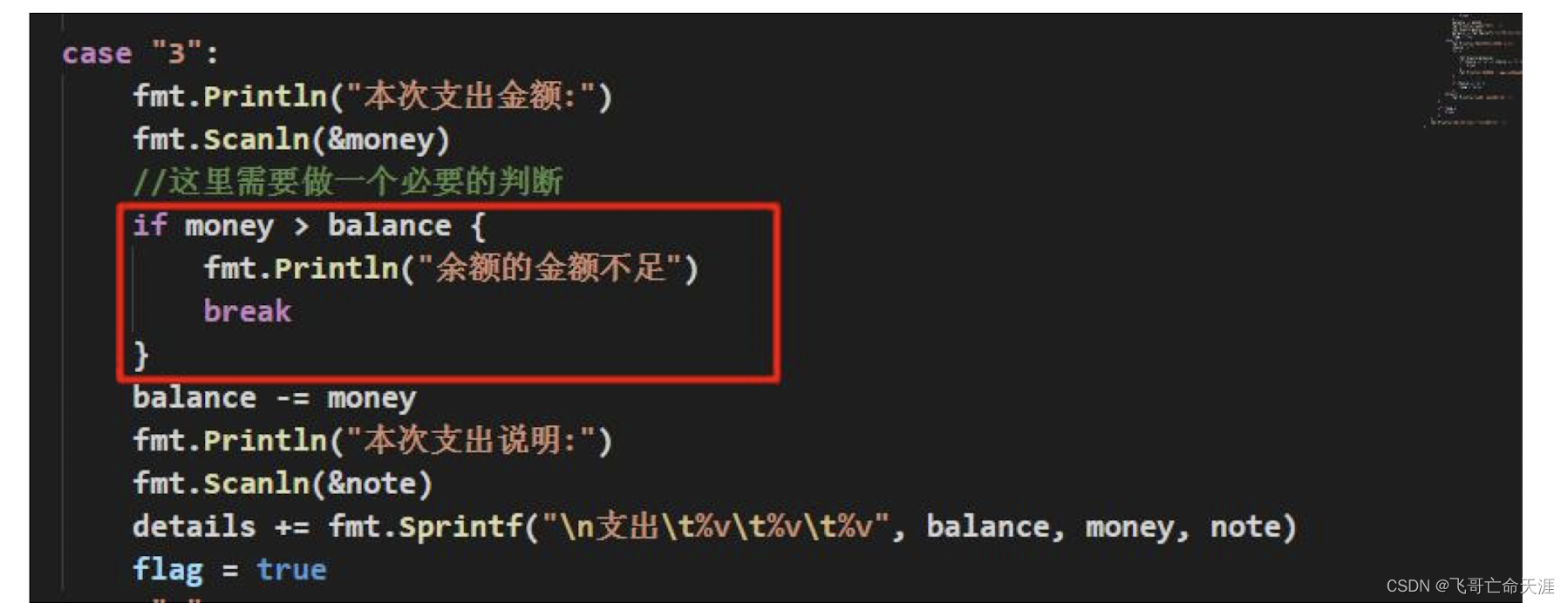
3) 在支出时,判断余额是否够,并给出相应的提示
````go
package main
import "fmt"
func main() {
key := ""
loop := true
balance := 10000.0
money := 0.0
note := ""
flag := false
details := "收支\t账户金额\t收支金额\t说 明"
for {
fmt.Println("-------------------家庭收支记账软件-------------------")
fmt.Println(" 1 收支明细")
fmt.Println(" 2 登记收入")
fmt.Println(" 3 登记支出")
fmt.Println(" 4 退出软件")
fmt.Print("请选择(1-4):")
fmt.Scanln(&key)
switch key {
case "1":
fmt.Println("-------------------当前收支明细-------------------")
if flag {
fmt.Println(details)
} else {
fmt.Println("当前没有明细,来一笔吧!")
}
fmt.Println(details)
case "2":
fmt.Println("本次收入金额:")
fmt.Scanln(&money)
balance += money
fmt.Println("本次收入说明")
fmt.Scanln(¬e)
details += fmt.Sprintf("\n收入\t %v \t %v \t \t %v", balance, money, note)
fmt.Println(" 登记收入")
flag = true
case "3":
fmt.Println("本次支出金额:")
fmt.Scanln(&money)
if money>balance{
fmt.Println("余额的金额不足!")
break
}
balance -= money
fmt.Println("本次支出说明")
fmt.Scanln(¬e)
details += fmt.Sprintf("\n支出\t %v \t %v \t \t %v", balance, money, note)
fmt.Println(" 登记支出")
flag = true
case "4":
fmt.Println("你确定要退出吗?y/n")
choice := ""
for {
fmt.Scanln(&choice)
if choice == "y" || choice == "n" {
break
}
fmt.Println("你的输入有误,请重新输入y/n")
}
if choice == "y" {
loop = false
}
default:
fmt.Println("请输入正确的选项!")
}
if !loop {
break
}
}
fmt.Println("退出该软件!")
}
将 面 向 过 程 的 代 码 修 改 成 面 向 对 象 的 方 法 , 编 写 myFamilyAccount.go , 并 使 用 testMyFamilyAccount.go 去完成测试
思路分析:
把记账软件的功能,封装到一个结构体中,然后调用该结构体的方法,来实现记账,显示明细。
结构体的名字 FamilyAccount .
在通过在 main方法中,创建一个结构体 FamilyAccount 实例,实现记账即可.
model
package model

import "fmt"

type FamilyAccount struct {
key     string
loop    bool
money   float64
balance float64
note    string
flag    bool
details string
}

func NewFamilyAccount() *FamilyAccount {
return &FamilyAccount{
key:     "",
loop:    true,
money:   0.0,
balance: 0.0,
note:    "",
flag:    false,
details: "收支\t账户金额\t收支金额\t说   明",
}
}

func (this *FamilyAccount) showDetails() {
fmt.Println("-------------------当前收支明细-------------------")
if this.flag {
fmt.Println(this.details)
} else {
fmt.Println("当前没有明细,来一笔吧!")
}
fmt.Println(this.details)
}

func (this *FamilyAccount) income() {
fmt.Println("本次收入金额:")
fmt.Scanln(&this.money)
this.balance += this.money
fmt.Println("本次收入说明")
fmt.Scanln(&this.note)
this.details += fmt.Sprintf("\n收入\t   %v \t   %v \t  \t %v", this.balance, this.money, this.note)
fmt.Println("                     登记收入")
this.flag = true
}

func (this *FamilyAccount) outcome() {
fmt.Println("本次支出金额:")
fmt.Scanln(&this.money)
if this.money > this.balance {
fmt.Println("余额的金额不足!")
//break
}
this.balance -= this.money
fmt.Println("本次支出说明")
fmt.Scanln(&this.note)
this.details += fmt.Sprintf("\n支出\t   %v \t   %v \t  \t  %v", this.balance, this.money, this.note)
fmt.Println("                     登记支出")
this.flag = true
}
func(this *FamilyAccount)exit(){
fmt.Println("你确定要退出吗?y/n")
choice := ""
for {

fmt.Scanln(&choice)
if choice == "y" || choice == "n" {
break
}
fmt.Println("你的输入有误,请重新输入y/n")
}
if choice == "y" {
this.loop = false
}
}

func (this *FamilyAccount) MainMenu() {
for {
fmt.Println("-------------------家庭收支记账软件-------------------")
fmt.Println("                     1 收支明细")
fmt.Println("                     2 登记收入")
fmt.Println("                     3 登记支出")
fmt.Println("                     4 退出软件")
fmt.Print("请选择(1-4):")
fmt.Scanln(&this.key)
switch this.key{
case"1":
this.showDetails()
case"2":
this.income()
case"3":
this.outcome()
case"4":
this.exit()
default:
fmt.Println("请输入正确选项..")
}
if!this.loop{
break
}
}
}
main
package main

import (
"fmt"
"go_code/go_code/chapter12/model"
)

func main() {
fmt.Println("面向对象")
model.NewFamilyAccount().MainMenu()
}
对项目的扩展功能的练习
- 对上面的项目完成一个转账功能
在使用该软件前,有一个登录功能,只有输入正确的用户名和密码才能操作.
model
package model

import "fmt"

type User struct {
Username string
Pwd      string
key      string
loop     bool
money    float64
balance  float64
note     string
flag     bool
details  string
}

func NewUser() *User {
return &User{
key:     "",
loop:    true,
money:   0.0,
balance: 0.0,
note:    "",
flag:    false,
details: "收支\t账户金额\t收支金额\t说   明",
Pwd:"666666",
Username: "tianyi1",
}
}

func (this *User) showDetails() {
fmt.Println("-------------------当前收支明细-------------------")
if this.flag {
fmt.Println(this.details)
} else {
fmt.Println("当前没有明细,来一笔吧!")
}
}

func (this *User) income() {
fmt.Println("本次收入金额:")
fmt.Scanln(&this.money)
this.balance += this.money
fmt.Println("本次收入说明")
fmt.Scanln(&this.note)
this.details += fmt.Sprintf("\n收入\t   %v \t   %v \t  \t %v", this.balance, this.money, this.note)
fmt.Println("                     登记收入")
this.flag = true
}

func (this *User) outcome() {
fmt.Println("本次支出金额:")
fmt.Scanln(&this.money)
if this.money > this.balance {
fmt.Println("余额的金额不足!")
//break
}
this.balance -= this.money
fmt.Println("本次支出说明")
fmt.Scanln(&this.note)
this.details += fmt.Sprintf("\n支出\t   %v \t   %v \t  \t  %v", this.balance, this.money, this.note)
fmt.Println("                     登记支出")
this.flag = true
}
func (this *User) exit() {
fmt.Println("你确定要退出吗?y/n")
choice := ""
for {

fmt.Scanln(&choice)
if choice == "y" || choice == "n" {
break
}
fmt.Println("你的输入有误,请重新输入y/n")
}
if choice == "y" {
this.loop = false
}
}
func (user *User) Login(username string, pwd string) {
for {
fmt.Println("请输入用户名")
fmt.Scanln(&user.Username)
if username !=user.Username  {
fmt.Println("输入的用户名不正确,请重新输入:")
user.Login("", "")
} else {
break
}
}
for {
fmt.Println("请输入密码")
fmt.Scanln(&user.Pwd)
if  pwd!= user.Pwd {
fmt.Println("输入的密码不正确,请重新输入:")
} else {
fmt.Println("恭喜您,进入系统!")
user.MainMenu()
}
}
}

//将转账写成一个方法
func (user *User)Transfer(){
fmt.Println("------------------------转账功能-------------------")
fmt.Println("本次转账金额:")
fmt.Scanln(&user.money)
if user.money>user.balance{
fmt.Println("你的余额不足")
}
user.balance -=user.money
fmt.Println("本次转账说明:")
fmt.Scanln(&user.note)
user.details+=fmt.Sprintf("\n转账\t   %v \t   %v \t  \t  %v",user.balance, user.money, user.note)
}
func (user *User) MainMenu() {
for {
fmt.Println("-------------------家庭收支记账软件-------------------")
fmt.Printf("用户%v已登录\n", user.Username)
fmt.Println("                     1 收支明细")
fmt.Println("                     2 登记收入")
fmt.Println("                     3 登记支出")
fmt.Println("                     4 选择转账")
fmt.Println("                     5 退出软件")
fmt.Print("请选择(1-5):")
fmt.Scanln(&user.key)
switch user.key {
case "1":
user.showDetails()
case "2":
user.income()
case "3":
user.outcome()
case "4":
user.Transfer()
case "5":
user.exit()
default:
fmt.Println("请输入正确选项..")
}
if !user.loop {
break
}
}
}
main
package main

import (
"fmt"
"go_code/go_code/chapter12/model"
)

func main() {

fmt.Println("这个是面向对象的方式完成..\n")
//调用登录页面Showcode
model.NewUser().Login("tianyi1","666666")

}
以上就是Go-家庭收支记账软件项目实现的详细内容,更多关于Go项目实现的资料请关注我们其它相关文章!


