
网站中有很多需要设置的内容,像网站信息,注册设置,上传设置等。如果保存在数据库中需要单独建张表,表中只有一条记录,这样会让数据库很臃肿,而且频繁存取数据库的效率也是个问题。而保存在config文件里是个不错选择,而且带有缓存功能!
我们可以在web.config的配置节写入配置。
<configuration>
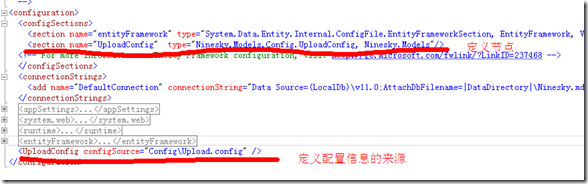
 <configSections>
 <section name="entityFramework" type="System.Data.Entity.Internal.ConfigFile.EntityFrameworkSection, EntityFramework, Version=6.0.0.0, Culture=neutral, PublicKeyToken=b77a5c561934e089" requirePermission="false" />
 <!--这里可以定义配置节 -->
 <!-- For more information on Entity Framework configuration, visit http://go.microsoft.com/fwlink/?LinkID=237468 -->
 </configSections>
但是把大量的配置都写入这里也会造成web.config的臃肿,可以采用把配置节定义在这里,把具体配置信息保存在其他文件中。
以上传配置信息为例,看一下理想的结构
ConfigUpload.config的内容
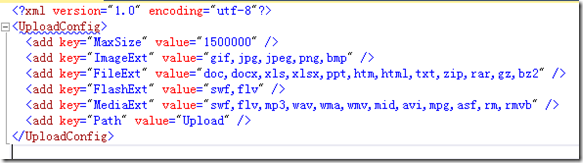
1、配置的元素。采用<add />的形式,是一个键和值得表示形式。<add key="MaxSize" value="1500000" />。
2、元素的集合,里面定义一系列的元素。<UploadConfig>……</UploadConfig>
3、自定义节,表示自定义的一个节点。<section name="UploadConfig" type="Ninesky.Models.Config.UploadConfig, Ninesky.Models"/>
name:节点名,type:处理节点的类行,逗号前是类名,逗号后是缩在程序集。
我们要创建这个类来管理配置
一、创建键,值元素类。
里面只有两个读写属性key和value,内容非常简单
using System.Configuration;

namespace Ninesky.Models.Config
{
 /// <summary>
 /// 键值元素类
 /// <remarks>
 /// 创建:2014.03.09
 /// </remarks>
 /// </summary>
 public class KeyValueElement:ConfigurationElement
 {
  /// <summary>
  /// 键
  /// </summary>
  [ConfigurationProperty("key",IsRequired=true)]
  public string Key {
   get { return this["key"].ToString(); }
   set { this["key"] = value; }
  }
  /// <summary>
  /// 值
  /// </summary>
  [ConfigurationProperty("value")]
  public string Value
  {
   get { return this["value"].ToString(); }
   set { this["value"] = value; }
  }
 }
}
二、创建元素集合类。内容很简单都进行了注释
using System;
using System.Configuration;
namespace Ninesky.Models.Config
{
/// <summary>
/// 元素集合类
/// <remarks>
/// 创建:2014.03.09
/// </remarks>
/// </summary>
[ConfigurationCollection(typeof(KeyValueElement))]
public class KeyValueElementCollection:ConfigurationElementCollection
{
//忽略大小写
public KeyValueElementCollection() : base(StringComparer.OrdinalIgnoreCase) { }
/// <summary>
/// 集合中指定键的元素
/// </summary>
/// <param name="name"></param>
/// <returns></returns>
new public KeyValueElement this[string name]
{
get { return (KeyValueElement)base.BaseGet(name); }
set
{
if (base.Properties.Contains(name)) base[name] = value;
else base.BaseAdd(value);
}
}
/// <summary>
/// 创建新元素.
/// 必须重写
/// </summary>
/// <returns></returns>
protected override ConfigurationElement CreateNewElement()
{
return new KeyValueElement();
}
/// <summary>
/// 获取元素的键
/// </summary>
/// <param name="element"></param>
/// <returns></returns>
protected override object GetElementKey(ConfigurationElement element)
{
return ((KeyValueElement)element).Key;
}
}
}


