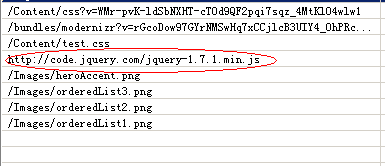
这里大家可以按模块化去配置,我们看到的下面的Url对应的就是上面的bundles.Add(...) 所增加的js、css的virtualPath
需要注意的是不同virtualPath 增加的相同的资源文件,会被重复加载!

前台调用
对于公共的资源文件,通常我们都会放到_Layout.cshtml (webform中的母板页) 文件中
Script文件引用:@Scripts.Render(virtualPath[,virtualPath1][,virtualPath2][,...])
CSS文件引用: @Styles.Render(virtualPath[,virtualPath1][,virtualPath2][,...])
正则匹配需要的,过滤不需要的
bundles.IgnoreList.Clear(); bundles.IgnoreList.Ignore("*.debug.js"); bundles.IgnoreList.Ignore("*.min.js"); bundles.IgnoreList.Ignore("*-vsdoc.js"); bundles.IgnoreList.Ignore("*intellisense.js"); bundles.Add(new ScriptBundle("~/bundles/jquery", jqueryCdn).Include( "~/Scripts/jquery-{version}.js")); //匹配jquery版本 bundles.Add(new ScriptBundle("~/bundles/jqueryval").Include( "~/Scripts/jquery.unobtrusive*", //匹配文件名前缀为jquery.unobtrusive "~/Scripts/jquery.validate*")); ...使用CDN
bundles.UseCdn = true; //使用CDN string jqueryCdn = "http:deom.jb51.net/jslib/jquery/jquery-1.7.1.min.js"; bundles.Add(new ScriptBundle("~/bundles/jquery", jqueryCdn).Include( "~/Scripts/jquery-{version}.js"));当cdn服务器挂了或不能访问了,这里就会选择本地的资源文件,debug下mvc 会让我们看到他原来的面具,这点非常好利于我们调试。