
XSL即可扩展的样式表文件。 可以格式化xml的显示,也可以将xml转换成需要的另一种格式。
学习XSL必须熟悉XPath。XSL和XPath一样简单强大,容易学习。
1. XSL既然可以格式化xml的显示样式,我们先来看如何在xml中引用xsl文件
如下代码示例:
<?xml version="1.0" encoding="utf-8"?>
<?xml-stylesheet type="text/xsl" href="url.xsl"?>
只需在xml文件的文档声明后面添加<?xml-stylesheet type=”text/xsl” href=”url.xsl”?>即可
2. XSL的格式
XSL也是一个标准的xml文件,它以xml文档声明开始,根元素必须是xsl:styleshee,同时根元素必须有version属性指定xsl的版本,和xmlns:xsl=” http://www.w3.org/1999/XSL/Transform”指定xsl命名空间,如下示例
<?xml version="1.0" encoding="encoding”?>
<xsl:stylesheet version="1.0" xmlns:xsl="http://www.w3.org/1999/XSL/Transform">
3. Xsl要点 如下示例xml
<?xml version="1.0" encoding="utf-8" ?>
<?xml-stylesheet type="text/xsl" href="pets-templates.xsl"?>
<pets>
<pig color="blue" weight="100">
<price>100</price>
<desc>this is a blue pig</desc>
</pig>
<cat color="red" weight="9">
<price>80</price>
<desc>this is a red cat</desc>
</cat>
<dog color="green" weight="15">
<price>80</price>
<desc>this is a green dog</desc>
</dog>
<cat color="green" weight="15">
<price>80</price>
<desc>this is a green cat</desc>
</cat>
<dog color="blue" weight="10">
<price>100</price>
<desc>this is a blue dog</desc>
</dog>
<dog color="red" weight="9">
<price>80</price>
<desc>this is a red dog</desc>
</dog>
</pets>
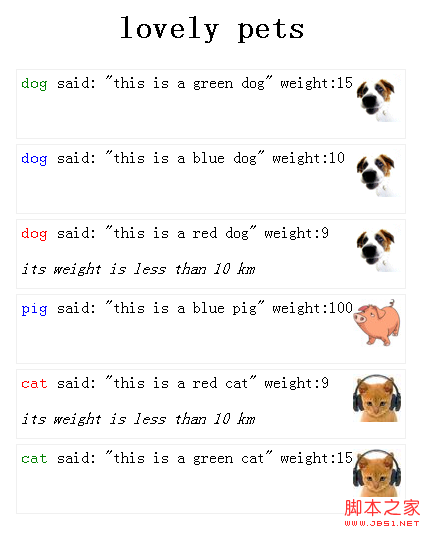
上面的xml在通过xsl格式化之后的显示效果如下:
学习XSL必须熟悉XPath。XSL和XPath一样简单强大,容易学习。
1. XSL既然可以格式化xml的显示样式,我们先来看如何在xml中引用xsl文件
如下代码示例:
<?xml version="1.0" encoding="utf-8"?>
<?xml-stylesheet type="text/xsl" href="url.xsl"?>
只需在xml文件的文档声明后面添加<?xml-stylesheet type=”text/xsl” href=”url.xsl”?>即可
2. XSL的格式
XSL也是一个标准的xml文件,它以xml文档声明开始,根元素必须是xsl:styleshee,同时根元素必须有version属性指定xsl的版本,和xmlns:xsl=” http://www.w3.org/1999/XSL/Transform”指定xsl命名空间,如下示例
<?xml version="1.0" encoding="encoding”?>
<xsl:stylesheet version="1.0" xmlns:xsl="http://www.w3.org/1999/XSL/Transform">
3. Xsl要点 如下示例xml
<?xml version="1.0" encoding="utf-8" ?>
<?xml-stylesheet type="text/xsl" href="pets-templates.xsl"?>
<pets>
<pig color="blue" weight="100">
<price>100</price>
<desc>this is a blue pig</desc>
</pig>
<cat color="red" weight="9">
<price>80</price>
<desc>this is a red cat</desc>
</cat>
<dog color="green" weight="15">
<price>80</price>
<desc>this is a green dog</desc>
</dog>
<cat color="green" weight="15">
<price>80</price>
<desc>this is a green cat</desc>
</cat>
<dog color="blue" weight="10">
<price>100</price>
<desc>this is a blue dog</desc>
</dog>
<dog color="red" weight="9">
<price>80</price>
<desc>this is a red dog</desc>
</dog>
</pets>
上面的xml在通过xsl格式化之后的显示效果如下:
1) xsl:template定义匹配节点的转换模板,属性match=”xpath expression”用来定义模板匹配的元素
如下定义匹配根节点的模板
<xsl:template match=”/”>
</xsl:template>
2) xsl:for-each循环显示select=”xpath expression”选择节点的转换 (类似编程语言中的foreach语句),
如下示例,选择了pets下面的子元素,并循环显示子元素的几点名字:
<xsl:for-each select=”/pets/*”>
<xsl:value-of select=”name()”/>
</xsl:for-each>


