
到目前为止,这足以让你收到一个简单的通知。
通知内容
通过不同的通知内容,有不同的方式来使一个App来收到不同类型的通知,这些通知内容包括应用程序通知用户的信息,或者用户自定义的信息。
给用户发送通知,使用JSON格式,这个格式本身包含一个字典,对应aps的key。在这第二个字典你指定载内容和key。
最常见的是:
向用户显示的通知消息。这是一个简单的字符串,或一个字典key和标题一样,正文等等。
接收到通知的声音。它可以是一个定制的声音,或一个系统的声音。
应用图标右上角的角标个数。将其设置为0,消除角标。
有效的内容。使用值1发送一个无声的通知给用户。它不会播放任何声音,或任何角标设置,但是当通知被唤醒,应用将与服务器进行沟通。
本教程的一个简单的通知内容:
{
 "aps": {
 "alert": {
 "title":"Hello! :)",
 "body":"App closed..."
 },
 "badge":1,
 "sound":"default"
 }
}
应用程序的生命周期
拷贝device token粘贴在Pusher的token部分,拷贝这个JSON对象在Pusherd的payload部分。
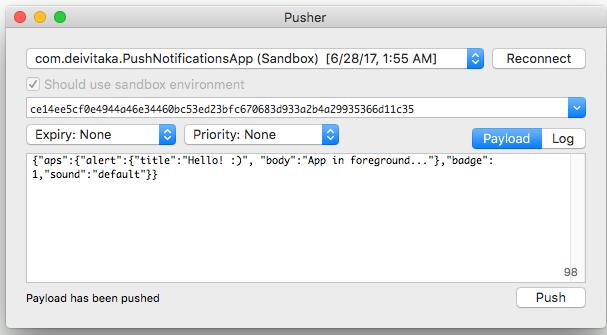
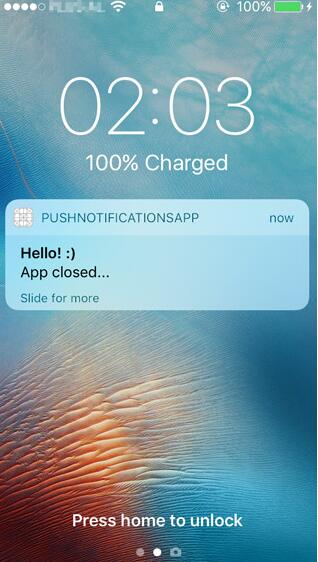
试着发送第一个通知。如果设备的屏幕被锁定,它将看起来如下,但什么都不会发生,当用户点击了这个通知视图。
接受通知,你需要添加新的方法:
private func getAlert(notification: [NSObject:AnyObject]) -> (String, String) {
 let aps = notification["aps"] as? [String:AnyObject]
 let alert = aps?["alert"] as? [String:AnyObject]
 let title = alert?["title"] as? String
 let body = alert?["body"] as? String
 return (title ?? "-", body ?? "-")
}
这将返回收到的通知标题和正文,如果结构是相同的。
func notificationReceived(notification: [NSObject:AnyObject]) {
 let viewController = window?.rootViewController
 let view = viewController as? ViewController
 view?.addNotification(
 title: getAlert(notification: notification).0,
 body: getAlert(notification: notification).1)
}
这个方法将在应用程序主要视图UITableView内添加一行(参见ViewController的完整项目代码)。
我测试了三个案例的推送通知:
当应用关闭时
如果用户打开应用程序的通知,调用didFinishLaunchingWithOptions方法更新,如下:
func application(_ application: UIApplication, didFinishLaunchingWithOptions launchOptions: [NSObject: AnyObject]?) -> Bool {
// Override point for customization after application launch.
application.applicationIconBadgeNumber = 0; // Clear badge when app launches
// Check if launched from notification
if let notification = launchOptions?[UIApplicationLaunchOptionsRemoteNotificationKey] as? [String: AnyObject] {
window?.rootViewController?.present(ViewController(), animated: true, completion: nil)
notificationReceived(notification: notification)
} else {
registerPushNotifications()
}
return true
}


