
最近,有时间看了点PHP的代码。参考PHP100教程做了简单的blog,这里面简单的记录一下。
首先是集成环境,这里选用的WAMP:http://www.wampserver.com/en/
首先通过,phpMyAdmin创建一张blog表。
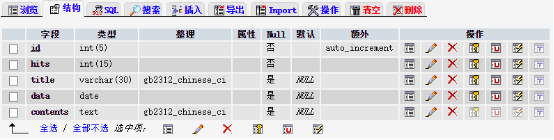
纯界面操作,过程比较简单,需要注意的是id是主键,并且设置auto_increnent 选项,表示该字段为空时自增。其它字段就比较随便了,注意类型和长度即可。
创建数据连接
在./wamp/www/blog目录下创建conn.php文件。
<?php

@mysql_connect("127.0.0.1:3306","root","") or die("mysql数据库连接失败");
@mysql_select_db("test")or die("db连接失败");
mysql_query("set names 'gbk'");

?>
mysql默认用户名为root,密码为空,这里创建的blog在test库中,所以需要连接test库。
添加blog
在./wamp/www/blog/目录下创建add.php文件。
<a href="index.php"><B>index</B></a>
<a href="add.php"><B>add blog</B></a>
<hr>


<?php
include("conn.php"); //引入连接数据库

if (!empty($_POST['sub'])) {
  $title = $_POST['title']; //获取title表单内容
  $con = $_POST['con'];   //获取contents表单内容
  $sql= "insert into blog values(null,'0','$title',now(),'$con')";
  mysql_query($sql);
  echo "insert success!";

}

?>

<form action="add.php" method="post">
  title  :<br>
  <input type="text" name="title"><br><br>
  contents:<br>
  <textarea rows="5" cols="50" name="con"></textarea><br><br>
  <input type="submit" name="sub" value="submit">

</form>
这段代码分两部分,上部分是PHP代码,include (或 require)语句会获取指定文件中存在的所有文本/代码/标记,并复制到使用 include 语句的文件中。
然后,判断表单中name='sub'的内容不为空的情况下,将获取表单的内容,然后执行$sql 语句,null 表示id为空(自增),now()表示取当前日起,$title和$con取表单中用户提交的内容。最后eche 插入成功的提示。
下半部分就是一段简单的HTML代码了,用于实现一个可以blog表单提交的功能。
创建blog的首页
在./wamp/www/blog/目录下创建index.php文件。
<a href="index.php"><B>index</B></a>
<a href="add.php"><B>add blog</B></a>
<br><br>
<form action="" method="get" style='align:"right"'>
<input type="text" name="keys" >
<input type="submit" name="subs" >
</form>
<hr>
<?php
include("conn.php"); //引入连接数据库
if (!empty($_GET['keys'])) {
$key = $_GET['keys'];
$w = " title like '%$key%'";
}else{
$w=1;
}
$sql ="select * from blog where $w order by id desc limit 5";
$query = mysql_query($sql);
while ($rs = mysql_fetch_array($query)) {
?>
<h2>title: <a href="view.php?id=<?php echo $rs['id']; ?>"><?php echo $rs['title']; ?></a>
| <a href="edit.php?id=<?php echo $rs['id']; ?>">edit</a>
| <a href="del.php?id=<?php echo $rs['id']; ?>">delete</a> |
</h2>
<li>date: <?php echo $rs['data']; ?></li>
<!--截取内容展示长度-->
<p>contents:<?php echo iconv_substr($rs['contents'],0,30,"gbk"); ?>...</p>
<hr>
<?php
};
?>


