
这个小小的留言板功能适合班级内或者公司内部之间的讨论,对话和留言,非常的方便,更重要的是无需网络,对于公司管理层来说是非常乐于常见的,
下面是这个留言板的写法:
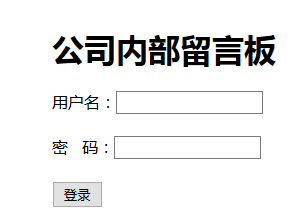
1 首先是登录页面:
<form action="chuli.php" method="post">
 <div style="margin-left: 500px; margin-top: 200px;
  height: 250px; width: 250px">/*为了把登录表放到页面中间,比较美观*/
  <h1>公司内部留言板</h1>
 <div style="margin-top: 20px">用户名:<input type="text" name="username"/></div><br/>
 <div>密   码:<input type="password" name="password"/></div><br/>
 <div><input type="submit" value="登录"/></div>
 </div>
</form>
2 登录页面完成后要进入登录处理页面了,也就是上面提交到的chuli.php
<?php
session_start(); // 登录之后要把所包含登录的页面连接起来,开启session
include("DADB.class.php");
$db=new DADB();
$user=$_POST["username"];
$pwd=$_POST["password"];
$sql="select password from yuangong where username='{$user}'";
$arr=$db->Query($sql);
if($arr[0][0]==$pwd && !empty($pwd))
{
 $_SESSION["username"]=$user;
 header("location:main.php");
}
else
{
 echo"登录失败";
}
?>
如图所示,是登录页面
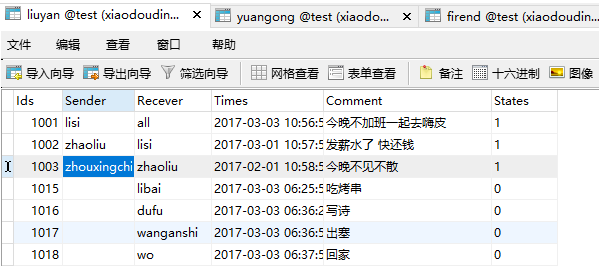
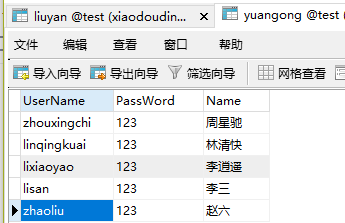
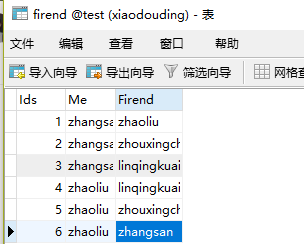
3.登录完成后是进入主页面,也就是显示自己收到的对话内容,下面是设计的数据库的表格和主页面的代码:
<body>
<div><h3><a href="fabu.php" rel="external nofollow" >发布信息</a>
<a href="tuichu.php" rel="external nofollow" >退出系统</a></h3> </div>
<br/><br/>
<h2>留言信息:</h2>
<table cellpadding="0" cellspacing="0" border="1" width="60%">
<tr>
<td>发送人</td>
<td>接收人</td>
<td>发送时间</td>
<td>信息内容</td>
</tr>
<?php
session_start();
if(empty($_SESSION["username"]))
{
header("location:login.php");
}
$user=$_SESSION["username"];
include("DADB.class.php");
$db=new DADB();
$sql="select * from liuyan where recever='$user' or recever='all' ";
$arr=$db->Query($sql);
foreach($arr as $v)
{ $fjr=uname($v[1]);
$jsr=uname($v[2]);
echo"<tr>
<td>{$fjr}</td> //发送人和接收人要用到姓名,所以这里我们调用了一个方法
<td>{$jsr}</td>
<td>{$v[3]}</td>
<td>{$v[4]}</td>
</tr>";
}
function uname($user) //运用了uname方法
{
global $db; //要想方法里面也可以用$db 这里用了全局变量
if($user=="all")
{
return "所有人";
}else
{
$sql1="select name from yuangong where username='{$user}'";
$att=$db->Query($sql1);
return $att[0][0];}
}
?>
</table>
</body>


