
</p>
</form>
</body>
</html>
对于用来处理用户输入的 PHP脚本,其基本逻辑是首先创建一个 DOM对象,然后读取 XML文件中的 XML数据,接下来在 XML对象上创建新的节点并将用户的输入储存起来,最后将 XML数据输出到原来的 XML文件中。具体实现代码如下所示。
<?php
$guestbook = new DomDocument(); //创建一个新的 DOM对象
$guestbook->load('DB/guestbook.xml'); //读取 XML数据
$threads = $guestbook->documentElement; //获得 XML结构的根
//创建一个新 thread节点
$thread = $guestbook->createElement('thread');
$threads->appendChild($thread);
//在新的 thread节点上创建 title标签
$title = $guestbook->createElement('title');
$title->appendChild($guestbook->createTextNode($_POST['title']));
$thread->appendChild($title);
//在新的 thread节点上创建 author标签
$author = $guestbook->createElement('author');
$author->appendChild($guestbook->createTextNode($_POST['author']));
$thread->appendChild($author);
//在新的 thread节点上创建 content标签
$content = $guestbook->createElement('content');
$content->appendChild($guestbook->createTextNode($_POST['content']));
$thread->appendChild($content);
//将 XML数据写入文件
$fp = fopen(”DB/guestbook.xml”, “w”);
if(fwrite($fp, $guestbook->saveXML()))
echo “留言提交成功”;
else
echo “留言提交失败”;
fclose($fp);
?>
在浏览器中运行上述 HTML文件并填写适当的留言内容,如图 2所示。
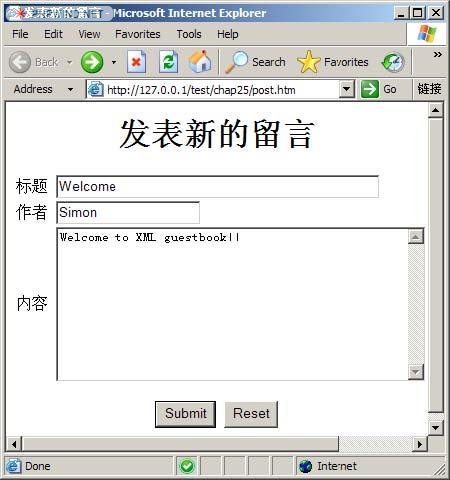
图 2 发表新留言界面
单击【Submit】按钮后,XML文件中的内容如下所示。
可以看到 XML文件中已经将留言存储起来了。
4.3 显示页面的编写
显示页面可以使用前面介绍的 SimpleXML组件很容易的实现,具体实现代码如下所示。
<?php
//打开用于存储留言的 XML文件
$guestbook = simplexml_load_file('DB/guestbook.xml');
foreach($guestbook->thread as $th) //循环读取 XML数据中的每一个 thread标签
{
echo “<B>标题:</B>”.$th->title.”<BR>”;
echo “<B>作者:</B>”.$th->author.”<BR>”;
echo “<B>内容:</B><PRE>”.$th->content.”</PRE>”;
echo “<HR>”;
}
?>
在浏览器中查看运行结果如图 3所示。


